Personal Profile
Personal Profile is your account management center, where you can view and manage personal information, YCoin balance, and subscription status.
Use Cases
When would you use Personal Profile?
- View Account Info: Check your user ID, email, YCoin balance, etc.
- Edit Personal Info: Change avatar or nickname
- Exchange YCoin: Convert YCoin to RMB
- Manage Subscription: View or modify subscription status
How to Use
View Account Information
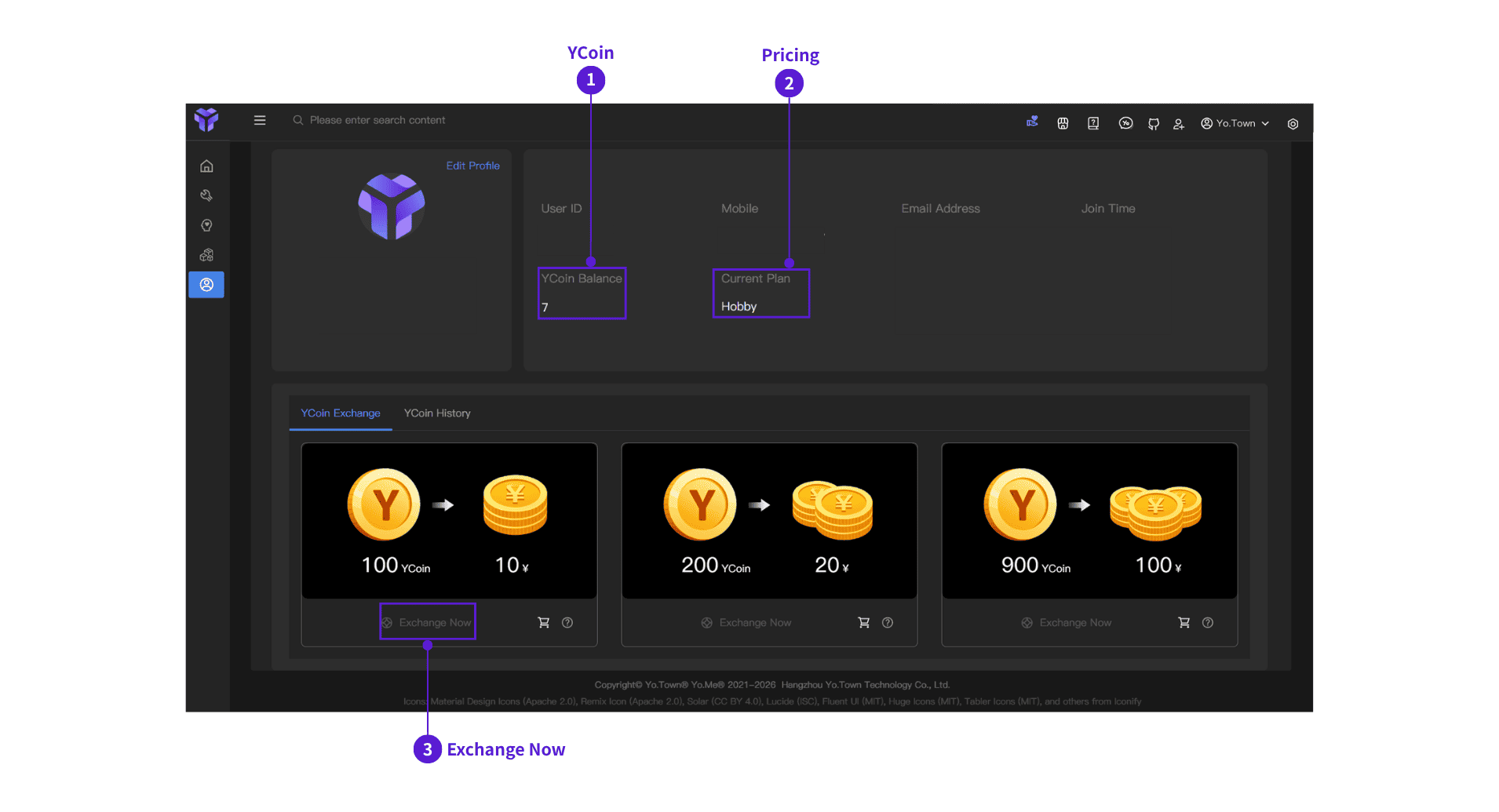
The top area displays your account info:
- Avatar and Nickname: Shown on the left card
- User ID: Your unique identifier
- Email Address: Registered email (partially hidden)
- Join Time: Registration time (e.g., "7 months ago")
⓵ YCoin Balance
- Shows your current YCoin amount
⓶ Subscription Management
- Click the "Current Subscription" status (e.g., "Hobby") to open the subscription page
- On that page, you can view benefits of different subscription plans
- After subscribing, you can also navigate to cancel subscription
⓷ YCoin Exchange
YCoin is Yo.Town Maker's virtual currency and can be exchanged for Yo.Town Shop balance.
Exchange steps:
- ⓵ Find the "YCoin Exchange" tab in the lower section (selected by default)
- ⓶ Select the amount to exchange:
- 100 YCoin -> RMB 10
- 200 YCoin -> RMB 20
- 900 YCoin -> RMB 100
- ⓷ Click "Exchange Now" to complete the exchange
You can only exchange when you have enough YCoin.
View exchange history:
- Click the "YCoin History" tab to view all exchange and transaction records
Edit Profile
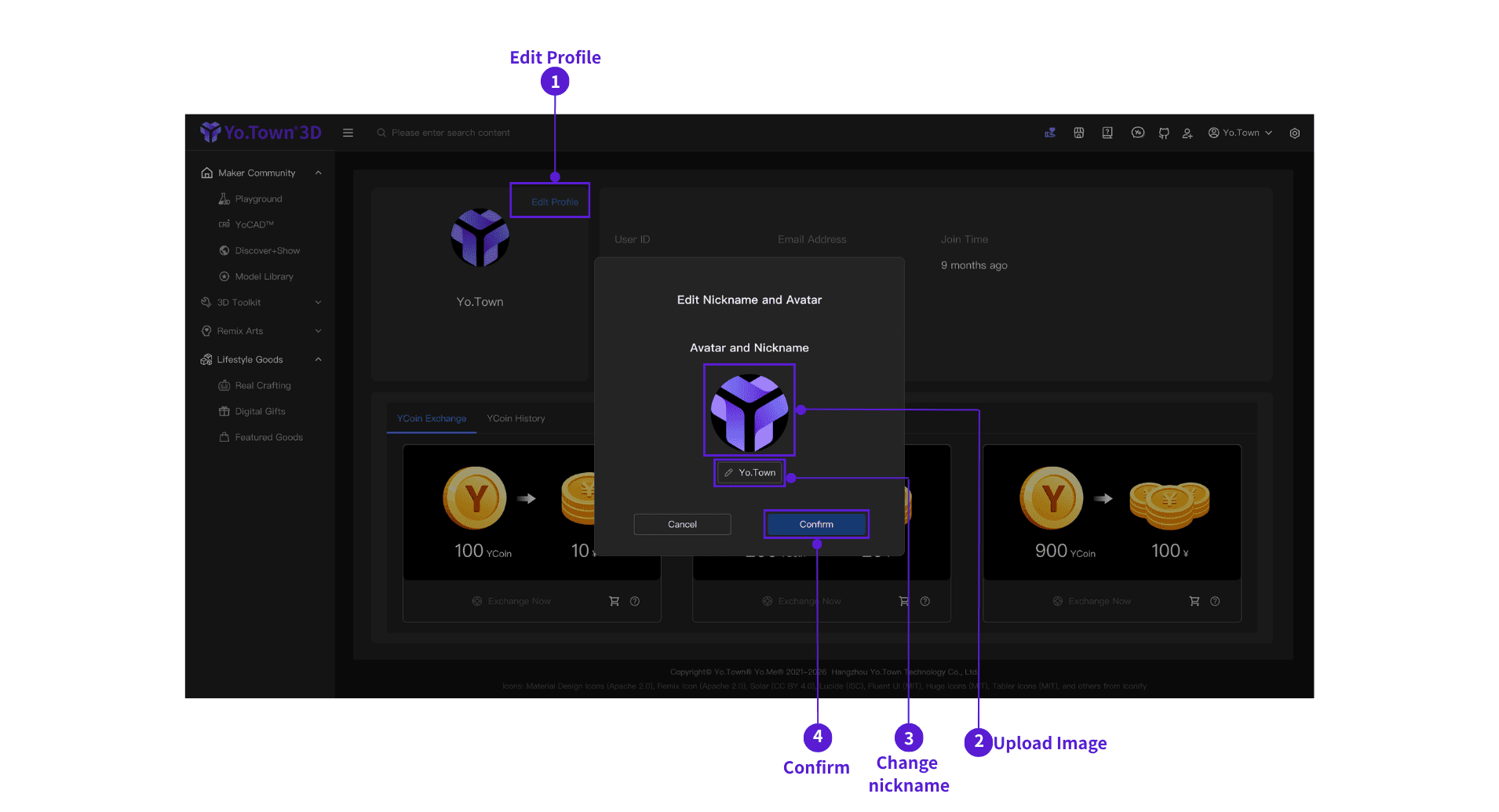
- ⓵ Click "Edit Profile": Click "Edit Profile" at the top-right corner
- ⓶ Change Avatar: Click the avatar area in the popup and choose a new image
- ⓷ Change Nickname: Enter a new nickname in the input box and click "Confirm"
- ⓸ Confirm: Click "Confirm" to save nickname changes
- Avatar can be replaced directly by clicking it
- After changing nickname, you must click "Confirm" to save
- Clicking "Cancel" or outside the popup will close the dialog
FAQ
Q: How can I change avatar and nickname?
A: Click "Edit Profile" at the top-right. In the popup, change avatar (click to replace) and nickname (enter text and click "Confirm").
Q: How can I get YCoin?
A: You can get YCoin from new-account registration rewards and inviting friends.
Q: What can YCoin be exchanged for?
A: It can be exchanged for Yo.Town Shop balance and used directly in the shop.
Q: How can I view YCoin usage records?
A: Click the "YCoin History" tab to view all exchange and transaction records.
Q: How can I manage subscriptions?
A: Click the "Current Subscription" status to open the subscription page, view plan benefits, and cancel subscription if needed.
Start Using Now
Click the button above to enter Yo.Town Maker's Personal Profile page and manage your account information.