Artifacts Posts
Artifacts Posts is your hub for managing personal works. You can view, share, delete saved creations, copy model share links, and send a model to other tools for further processing.
Use Cases
When would you use Artifacts Posts?
- View Works: When you want to see all saved works
- Save Works: When you want to keep works for future use
- Share Works: When you want to publish works to the community
- Manage Works: When you want to remove unnecessary works
Page Overview
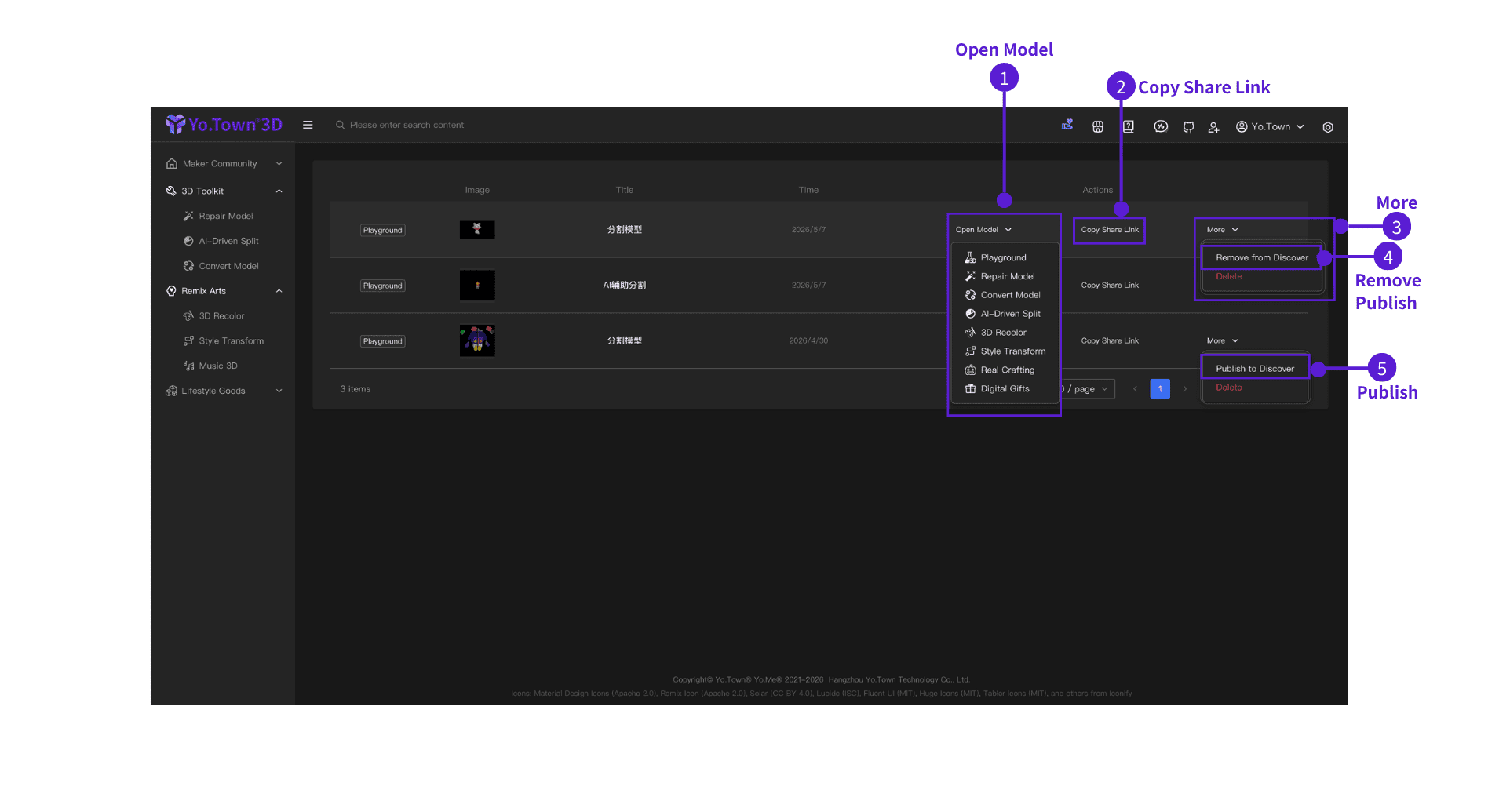
Works are shown in a table. Each row contains:
- Title: Name of the work
- Image: Preview image of the work (auto-generated)
- Actions: Three buttons (Open Model, More, and Copy Share Link)
How to Use
⓵ Open Model
Hover over the Open Model button to send the current work's model to another tool for editing.
Available tools:
Steps:
- Find the work you want to process
- Hover over Open Model in that row
- Choose the target tool from the dropdown menu
- The model loads automatically in the selected tool page
⓶ Copy Share Link
Click Copy Share Link to copy the model sharing link.
⓷ More
- ⓸ Remove from Discover: Stop showing the work on Discover+Show
- ⓹ Publish to Discover: Publish the work to Discover+Show so other users can see it
- Delete: Delete this work (red text, irreversible—confirm before proceeding)
Deletion notice
Deleting a work is irreversible. Please confirm before proceeding.
FAQ
Q: Can deleted works be recovered?
A: No. Deletion is irreversible. Please confirm you no longer need the work before deleting.
Q: What's the difference between "Open Model", "Copy Share Link", and "More"?
A:
- Open Model: Send the work's model to another tool for further editing (e.g., Playground, Repair Model)
- Copy Share Link: Copy the model sharing link for this work
- More: Publish to Discover, remove from Discover, or delete the work
Q: Can I delete works in batches?
A: Currently, works must be deleted one by one.
Start managing now
Click the button above to open Yo.Town Maker's Artifacts Posts page and start managing all your works.