Digital Gifts
Digital Gifts lets you package 3D models into personalized gift scenes. With Box, Wrapper, Sketch, Music, and Staging options, you can create a unique presentation and export it as a GIF or video.
Feature Overview
The Digital Gifts tool provides a complete gift-packaging workflow:
- Box - Choose from multiple gift box styles
- Wrapper - Apply different wrapper patterns and colors
- Sketch - Freely draw personalized patterns
- Music Selection - Add background music to gifts
- Create GIF / Create Video - Export the final gift scene as a GIF or video
How to Use
Create Digital Gifts
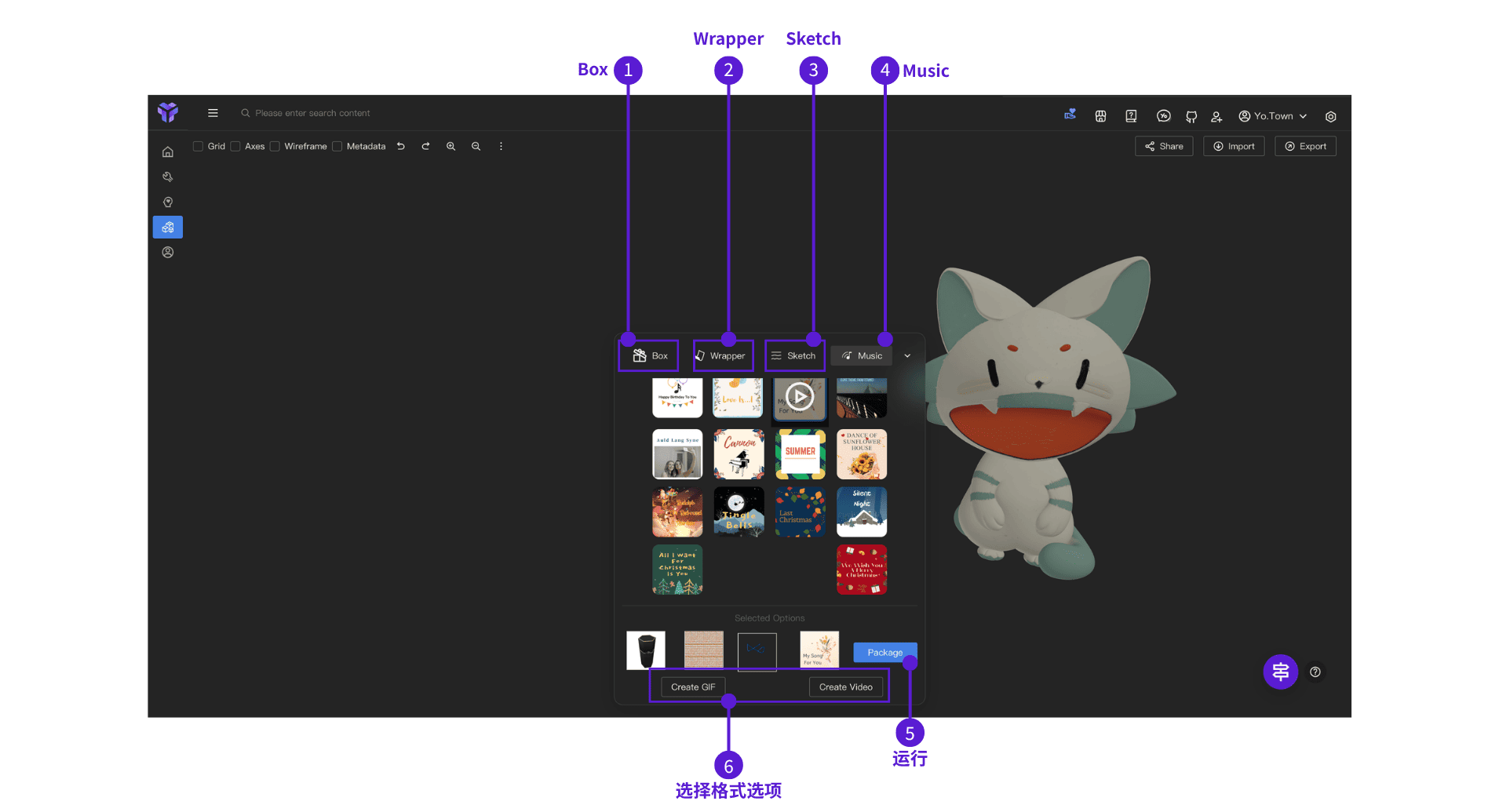
- ⓵ Select Box - In the bottom control panel, click the "Box" tab and choose your preferred box style
- ⓶ Select Wrapper (Optional) - Click the "Wrapper" tab and choose a pattern
- ⓷ Add Sketch (Optional) - Click the "Sketch" tab, select a color, and draw your pattern
- ⓸ Add Music (Optional) - Click the "Music" tab and choose background music
- ⓹ Package - Click the "Package" button to generate the wrapped gift scene
- ⓺ Create GIF or Video - After packaging, click "Create GIF" or "Create Video"; the file will download automatically after generation
FAQ
Q: Can I select multiple boxes at the same time?
A: Only one box can be selected at a time. If you want to change it, just reselect.
Q: Can hand-drawn patterns be deleted?
A: Yes. You can use the undo button to remove hand-drawn patterns, or redraw them.
Q: How long does it take to generate a GIF or video?
A: Generation time depends on model complexity.
Start Using Now
Click the button above to enter Yo.Town Maker's Digital Gifts page and start creating personalized gift scenes for your 3D models.